


Used Skills






ACF
Live Demo
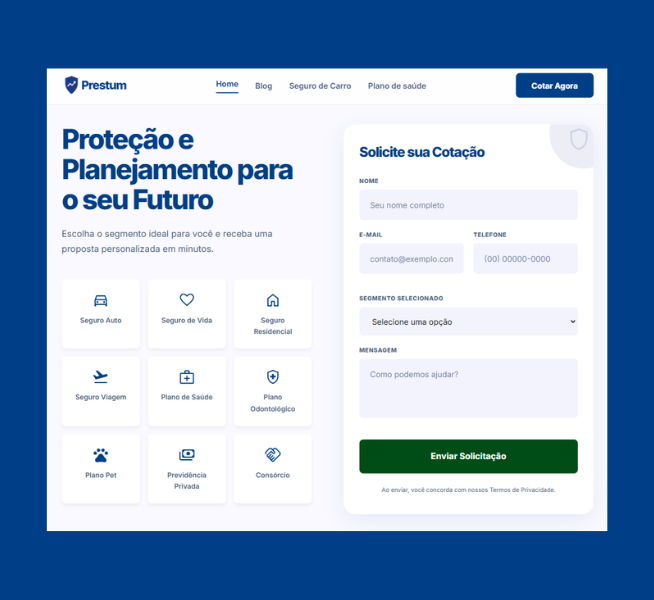
Converting a Figma design into a fully functional WordPress website — without relying on page builders — is one of the most in-demand skills in modern web development. This case study walks through how I built Prestum, a Brazilian insurance quotation platform, from a detailed Figma layout into a clean, high-performance WordPress theme built entirely with HTML, CSS, JavaScript, PHP, and ACF.
About the project
Prestum is a digital platform focused on insurance and financial planning, connecting users to auto, life, home, health, travel, and dental insurance products. The goal was to bring their Figma design to life as a fully custom WordPress site — pixel-perfect, fast, and easy for the client to manage — with no dependency on visual builders like Elementor or Divi.
Tech stack
WordPress
PHP
HTML5
CSS3
JavaScript
ACF (Advanced Custom Fields)
Figma (design source)
Building hard code — without a page builder — keeps the generated HTML clean, the codebase maintainable, and the performance scores high. ACF was used to make content editable by the client without touching the code directly.
From Figma to code: the process
The workflow followed a structured approach to ensure design fidelity and technical quality:
- Design audit in Figma — typography, spacing, components, and breakpoints
- Custom WordPress theme built from scratch with template hierarchy
- Semantic HTML/CSS components with accessibility in mind
- Vanilla JavaScript interactions: quotation form, testimonials slider, FAQ accordion
- ACF integration for fully editable custom fields
- Image optimization, lazy loading, and asset minification
Performance results (PageSpeed Insights — mobile)
The final scores on the mobile PageSpeed Insights audit show what hard-coded WordPress development can achieve when done right:
96
Performance
96
Accessibility
100
Best Practices
100
SEO
Core Web Vitals: First Contentful Paint at 0.9s, Largest Contentful Paint at 1.6s, and Total Blocking Time at 180ms — all in the green range according to Google’s thresholds.
Sections developed
- Hero with quotation form — custom fields for segment selection and lead submission
- Insurance categories grid — SVG icons with product type navigation
- Why choose us — benefit cards highlighting platform differentiators
- Testimonials carousel — client reviews with CSS-driven slider
- FAQ accordion — animated expand/collapse with pure CSS transitions
- Content blog — category-filtered article listing
- Full footer — quick links, social icons, and institutional copy
Why convert Figma to WordPress without a page builder?
Many clients arrive with a polished Figma file and need a developer who can translate it into real, production-ready code. The Figma-to-WordPress hard code service delivers clear advantages over visual builder solutions:
- Clean, dependency-free HTML output
- Significantly higher performance — especially on mobile
- Pixel-perfect fidelity to the original design
- Easier long-term maintenance and lower hosting costs
- Zero risk of plugin conflicts from builder frameworks
Final thoughts
The Prestum project is a concrete example of how a Figma-to-WordPress conversion, executed with care for clean code and best practices, delivers a professional-grade product — fast, accessible, and well-ranked in search engines. If you have a Figma design and need custom WordPress development, feel free to get in touch.